Control Method in Robot Vacuums: What It Is and Is It Worth It?
As an Amazon Associate we earn from qualifying purchases. Links on this page are affiliate links.
Control Method Explained For Buyers
You need to know how to start and stop your cleaning robot. This specification defines the control method. It lists the tools you use to command the device. Most modern units offer multiple options. You will see these labels on product pages.
Remote control is the simplest option. It uses infrared signals. You point the device at the vacuum and press a button. This method requires line of sight. It is reliable but limited. You cannot schedule jobs from across the room. It is useful for basic on-demand cleaning.
App control is the standard for smart homes. You connect the robot to your Wi-Fi network. The manufacturer provides a dedicated smartphone application. This interface allows deep customization. You can set no-go zones, select cleaning modes, and view maps. This is the most powerful control method explained in current reviews.
Voice control adds another layer of convenience. You link the robot to smart speakers. Commands like "start cleaning" or "return to dock" work via voice. This hands-free operation is ideal when your hands are full. It requires compatible hardware and stable internet.
Alexa integration is a specific type of voice control. If you own Amazon devices, this matters. You enable the skill in the Alexa app. You can then use wake words to operate the vacuum. This method syncs well with other smart home routines.
Why does this matter to you? Flexibility determines daily ease of use. A robot with only a remote is inconvenient. You must walk over to it every time. An app-only robot requires you to unlock your phone. Voice control solves this. You can start cleaning while cooking or working.
Check the product specifications carefully. Some models include all these methods. Others may lack app support. Ensure the control method fits your lifestyle. You want seamless interaction with your cleaning device.
Control Method Options Compared
Remote Control
This method uses a dedicated physical device to operate the robot. You press buttons to start cleaning, return the unit to its dock, or select spot modes. This approach requires no internet connection or smartphone. It is useful for users who prefer tactile feedback or have limited tech literacy. The trade-off is that you must physically be near the robot to use it. You cannot schedule cleanings or monitor progress from another room. The Tikom G8000 Max includes this feature alongside app control, giving you a manual backup option for quick starts or when Wi-Fi is unavailable.
Alexa
Alexa control allows you to command the robot using Amazon’s voice assistant. You link the device to your Alexa account and use voice commands to start or stop cleaning. This is ideal for hands-free operation, especially when your hands are full or dirty. You can also ask for the robot’s status. The main requirement is a compatible Alexa-enabled device, such as an Echo speaker. Some models, like the Shark UR2500SR AI Ultra and the Shark Matrix 2-in-1, rely primarily on this integration. This method simplifies interaction but depends on your existing smart home ecosystem and stable Wi-Fi connectivity for reliable response.
App Control
App control uses a smartphone application to manage the robot. You can start, stop, and schedule cleanings from anywhere with an internet connection. This method often includes advanced features like mapping, room selection, and cleaning history. It suits users who want detailed control over their cleaning routine. The Shark IQ Self-Emptying Robot Vacuum and the iRobot Roomba 105X Combo use app control for scheduling and navigation management. The trade-off is the need to download and maintain the app. You also need a stable Wi-Fi connection. This method offers the most flexibility but requires initial setup and smartphone usage.
Voice Control
Voice control lets you operate the robot using spoken commands via a microphone. This is distinct from specific brand integrations like Alexa. It often works with various assistants or the robot’s own built-in voice recognition. The Lefant M210P uses this method for hands-free operation. You can start cleaning without touching a button or phone. This is practical for users who want simplicity. However, accuracy depends on ambient noise and microphone quality. You may need to speak clearly to ensure the robot understands your command. This method offers convenience but may lack the detailed scheduling options found in app controls. It is best for quick, on-demand cleaning sessions.
Is Control Method Worth It?
Who needs it
You should prioritize this specification if you value flexibility and convenience in your daily routine. The combination of app control, voice assistants like Alexa, and a physical remote offers multiple ways to interact with your device. If you often clean while multitasking, voice control lets you start the robot without touching your phone. App control provides detailed scheduling and room-specific cleaning, which is ideal for larger homes with varied floor types. The physical remote serves as a reliable backup if your Wi-Fi drops or if you prefer tactile buttons. Buyers who want precise command over start, stop, and spot cleaning modes will find this multi-method setup essential. It ensures you can always initiate a cleaning cycle regardless of your current activity or device availability. This versatility reduces friction in your cleaning workflow.
Who can skip it
You can ignore detailed control methods if you plan to use your robot purely as a set-and-forget appliance. If you only schedule cleaning via a basic app interface and never need voice commands or remote overrides, the extra control options add little value. Buyers who prioritize suction power, battery life, or mopping performance over interaction methods should focus on those core cleaning specs instead. The control interface is secondary to how well the machine actually cleans your floors. If you are comfortable with a single control method, such as just the app, you do not need to pay attention to voice compatibility or remote inclusion. Prioritize the hardware that impacts cleaning results directly. Control flexibility is a nice-to-have feature, not a necessity for effective floor maintenance. Focus your budget on filtration systems and navigation accuracy if cleaning performance is your main goal.
Control Method Glossary
App Control
Using a smartphone application to start, stop, or schedule cleaning cycles remotely. This method requires Wi-Fi connectivity and a paired device.
Voice Assistant
Controlling the robot through spoken commands via services like Alexa or Google Home. This hands-free method simplifies operation for busy users.
Physical Remote
A dedicated handheld device with buttons to operate the robot without internet access. It provides direct control for immediate start or dock commands.
Auto-Clean
A feature that initiates cleaning without manual input. This mode often relies on schedules set in the app or motion sensors to trigger cycles.
Wi-Fi
Wireless internet connection required for app and voice control features. Without this connectivity, advanced remote commands and scheduling options remain unavailable.
Scheduled Cleaning
Setting specific times for the robot to begin its cleaning cycle automatically. This feature ensures regular maintenance without requiring daily user intervention.
Spot Mode
A cleaning setting focused on a small, specific area. You activate this via app or remote to target high-traffic zones or spills.
Quick picks
| # | Product | Best for | Price |
|---|---|---|---|
| 1 | Shark Robot Vacuum with Self-Empty Base | Voice-controlled cleaning with self-emptying convenience | Check price of Shark Robot Vacuum with Self-Empty Base on Amazon |
| 2 | Shark IQ Self-Emptying Robot Vacuum | Pet owners seeking automated dust disposal | Check price of Shark IQ Self-Emptying Robot Vacuum on Amazon |
| 3 | Lefant Compact Voice-Controlled Robot Vacuum | Low-clearance homes with hard floors and pets | Check price of Lefant Compact Voice-Controlled Robot Vacuum on Amazon |
| 4 | Tikom Slim Robot Vacuum and Mop | Users wanting multiple control methods and slim design | Check price of Tikom Slim Robot Vacuum and Mop on Amazon |
| 5 | Shark Matrix 2-in-1 Robot Vacuum and Mop | Voice-controlled deep cleaning on mixed floors | Check price of Shark Matrix 2-in-1 Robot Vacuum and Mop on Amazon |
| 6 | iRobot Roomba 105X Combo Vacuum and Mop | App-controlled LiDAR mapping and mopping | Check price of iRobot Roomba 105X Combo Vacuum and Mop on Amazon |
Our 6 picks

Shark Robot Vacuum with Self-Empty Base
Best for: Voice-controlled cleaning with self-emptying convenience
- Control Method
- Alexa (what this guide is about)
- Navigation Type
- 360 degrees LiDAR vision
- Dock Capabilities
- Bagless self-emptying base
- Self Empty Capacity
- Up to 30 days
- Connectivity
- WiFi
- Special Features
- Self-Emptying, Mapping
View on Amazon: Shark Robot Vacuum with Self-Empty Base Affiliate link
This Shark robot vacuum uses 360-degree LiDAR for precise home mapping and navigation. It features a bagless self-emptying base with a 30-day capacity, reducing manual maintenance. You can control it via Alexa or Google Assistant voice commands. The unit offers 120 minutes of runtime with recharge and resume capabilities. It is designed to handle pet hair and tough messes on various floor types.
Pros
- Bagless self-emptying base holds up to 30 days of debris
- 360-degree LiDAR vision for accurate mapping and object detection
- Voice control via Alexa or Google Assistant
- 120-minute runtime with recharge and resume function
Cons
- Control method is limited to voice assistants without explicit app control mention
- No mopping capability included in the specifications
- Base is bulky at 13.9 inches in height
Good fit if
- You want to control your vacuum using voice commands
- You have pets and need effective hair pickup
- You prefer not to empty the dustbin frequently
Skip if
- You require manual app-based scheduling and zone cleaning
- You need a robot vacuum that also mops floors
- You have limited space for a large self-emptying dock
Verdict: Shark UR2500SR AI Ultra Robot Vacuum suits users who prioritize voice control and hands-free maintenance. It is ideal for pet owners who want reliable navigation and long intervals between emptying cycles.
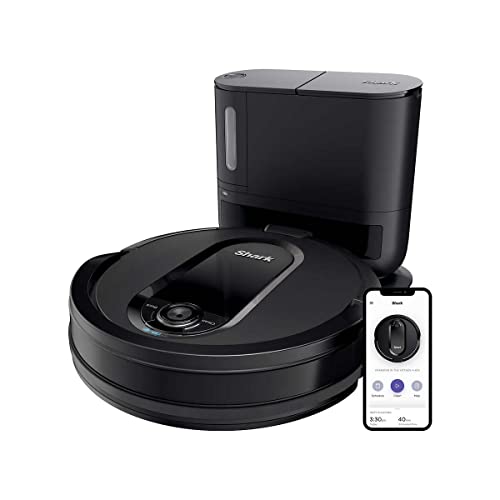
Shark IQ Self-Emptying Robot Vacuum
Best for: Pet owners seeking automated dust disposal
- Control Method
- App Control (what this guide is about)
- Dock Capabilities
- Self-emptying base
- Self Empty Capacity
- Up to 30 days
- Dimensions
- 12.9 × 12.6 × 3.5 inches
- Weight
- 12.2 pounds
View on Amazon: Shark IQ Self-Emptying Robot Vacuum Affiliate link
This Shark robot vacuum features app control and Alexa compatibility for hands-free operation. It includes a self-emptying base that holds up to 30 days of debris, reducing maintenance frequency. The unit uses Total Home Mapping to navigate row by row, ensuring systematic coverage. Weighing 12.2 pounds, it is designed for homes with pets, utilizing a self-cleaning brush roll to prevent hair wrap on carpets and hard floors.
Pros
- Self-emptying base holds up to 30 days of dirt
- Compatible with Shark Clean App and Alexa voice control
- Self-cleaning brush roll prevents hair wrap
- Total Home Mapping for targeted room cleaning
Cons
- No remote control included in specifications
- No mopping capability listed in features
- Renewed condition may vary in cosmetic appearance
Good fit if
- You want to minimize manual dust disposal with a self-emptying base
- You prefer controlling the vacuum via smartphone app or voice commands
- You have pets and need a brush roll that resists hair tangles
Skip if
- You require a vacuum that also mops hard floors
- You prefer physical remote control over app or voice operation
- You need a brand-new unit rather than a renewed one
Verdict: Shark IQ Robot Vacuum with Self-Emptying Base suits pet owners who want to automate dust disposal and control cleaning schedules through an app or Alexa. It is ideal for users who prioritize hands-free maintenance over manual emptying.

Lefant Compact Voice-Controlled Robot Vacuum
Best for: Low-clearance homes with hard floors and pets
- Control Method
- Voice Control (what this guide is about)
- Obstacle Avoidance
- Infrared sensors
- Connectivity
- Bluetooth, 2.4GHz Wi-Fi
- Special Features
- Self-Charging, Quiet
- Ideal For
- Hard Floors, Pet Hair
- Dimensions
- 11 × 11 × 2.99 inches
View on Amazon: Lefant Compact Voice-Controlled Robot Vacuum Affiliate link
The Lefant M210P is a compact robot vacuum designed for narrow spaces. It features a 11-inch diameter and 2.99-inch height to fit under furniture. You can control it via the app or voice commands through Alexa and Google Assistant. It offers six cleaning modes and three suction levels. This model suits users with hard floors and pet hair who want a quiet, self-charging device.
Pros
- Compact 11-inch diameter and 2.99-inch height for narrow spaces
- Voice control via Alexa and Google Assistant
- App control for scheduling and mode selection
- Unique suction port design reduces hair tangles
- Three adjustable suction levels including a quiet mode
Cons
- No remote control included
- Only supports 2.4GHz Wi-Fi
- Infrared sensors may be less advanced than LiDAR mapping
Good fit if
- You have low-clearance furniture like beds and sofas
- You want to control the vacuum with voice commands
- You have pet hair and hard floors
Skip if
- You need 5GHz Wi-Fi connectivity
- You require precise LiDAR mapping for multi-floor homes
- You prefer a remote control for manual operation
Verdict: The Lefant M210P Compact Robot Vacuum is a practical choice for users with low furniture and pets who prefer voice or app control over manual remotes.

Tikom Slim Robot Vacuum and Mop
Best for: Users wanting multiple control methods and slim design
- Control Method
- App Control, Remote Control (what this guide is about)
- Suction Power
- 5000Pa
- Cleaning Function
- Vacuum and mop
- Obstacle Avoidance
- Anti-collision and anti-fall sensors
- Special Features
- Mop, Self-Charging
- Ideal For
- Carpets, Hard Floors, Pet Hair
View on Amazon: Tikom Slim Robot Vacuum and Mop Affiliate link
The Tikom G8000 Max offers 5000Pa suction and simultaneous vacuuming and mopping. It features app and remote control methods, plus voice and button options. The 150-minute battery life and 2.99-inch height allow for long cleaning sessions and access under furniture. It handles hard floors and carpets with anti-collision sensors. This model suits users wanting multiple control options without complex mapping.
Pros
- 5000Pa suction power for pet hair and debris
- Simultaneous vacuum and mop with 450ml dustbin and 300ml water tank
- 150-minute battery life in quiet mode
- Supports App, Remote, Voice, and Button controls
- 2.99-inch height for cleaning under beds and sofas
Cons
- Uses anti-collision sensors rather than advanced obstacle avoidance
- No mention of LiDAR or camera-based navigation
- Remote control included but app features are basic
Good fit if
- You want a robot vacuum that supports both app and remote control
- You need a slim design to clean under low furniture
- You prefer simple button or voice controls alongside app settings
Skip if
- You require precise room mapping and no-go zones
- You need advanced obstacle avoidance to navigate cluttered rooms
- You only want app control without a remote
Verdict: Tikom G8000 Max Robot Vacuum and Mop fits users who value flexible control methods and a slim profile over advanced navigation. It is a practical option for homes with low furniture and mixed flooring.

Shark Matrix 2-in-1 Robot Vacuum and Mop
Best for: Voice-controlled deep cleaning on mixed floors
- Control Method
- Alexa (what this guide is about)
- Cleaning Function
- 2-in-1
- Navigation Type
- 360° LiDAR
- Mop Mechanism
- Sonic Mopping
- Special Features
- Mop, Self-Emptying
- Ideal For
- Carpets, Hard Floors, Pet Hair
View on Amazon: Shark Matrix 2-in-1 Robot Vacuum and Mop Affiliate link
This Shark model uses 360° LiDAR for precise home mapping and Alexa voice control. It features Sonic Mopping that scrubs hard floors 100 times per minute. The Matrix Clean system ensures deep coverage on carpets and hard floors. It includes a self-cleaning brushroll to handle pet hair effectively. This robot suits homes with pets and mixed flooring types.
Pros
- 360° LiDAR navigation for accurate mapping
- Sonic Mopping scrubs 100x per minute
- Alexa voice control for hands-free operation
- Matrix Clean grid pattern for thorough coverage
- Self-cleaning brushroll for pet hair
Cons
- No remote control included in the package
- Requires app for Matrix Mop settings
- Sonic Mopping only for hard floors
Good fit if
- You prefer controlling your vacuum via voice commands
- You have hard floors that need deep scrubbing
- You want precise LiDAR mapping for efficient cleaning
Skip if
- You need a remote control for manual operation
- You only have carpeted floors and no mopping needs
- You prefer app-only control without voice integration
Verdict: Shark RV2400WD IQ Robot Vacuum offers strong Sonic Mopping and LiDAR mapping for users who value voice control. It is ideal for pet owners with mixed flooring who want deep cleaning without manual intervention.

iRobot Roomba 105X Combo Vacuum and Mop
Best for: App-controlled LiDAR mapping and mopping
- Control Method
- App Control, Voice Control (what this guide is about)
- Suction Power
- 70x
- Cleaning Function
- Vacuum and mop
- Navigation Type
- ClearView LiDAR
- Dock Capabilities
- Auto-empty dock
- Self Empty Capacity
- Up to 75 days
View on Amazon: iRobot Roomba 105X Combo Vacuum and Mop Affiliate link
This robot vacuum and mop uses ClearView LiDAR for precise navigation and app control for customization. It features an auto-empty dock that holds debris for up to 75 days. The 70x suction power and SmartScrub mopping system handle hard floors and carpets. You get voice control and automatic rug protection. It suits homes where you want thorough, mapped cleaning without manual intervention.
Pros
- ClearView LiDAR navigation for efficient row cleaning
- Auto-empty dock with 75-day capacity
- App and voice control options
- SmartScrub mopping with micro-pump
- Automatic rug detection avoids wetting carpets
Cons
- Only supports 2.4 GHz Wi-Fi
- Requires sealed bags for the auto-empty dock
- No remote control included in specifications
Good fit if
- You want precise LiDAR mapping instead of random navigation
- You prefer app control and voice commands
- You have hard floors and low-pile carpets
Skip if
- You need 5 GHz Wi-Fi connectivity
- You want a remote control for manual operation
- You have only high-pile carpets without hard floors
Verdict: iRobot Roomba 105X Combo delivers precise LiDAR navigation and app control for homes that value mapped efficiency. It fits users who want hands-free maintenance with an auto-empty dock and smart mopping features.
Specifications side by side
| Spec | Shark Robot Vacuum with Self-Empty Base | Shark IQ Self-Emptying Robot Vacuum | Lefant Compact Voice-Controlled Robot Vacuum | Tikom Slim Robot Vacuum and Mop | Shark Matrix 2-in-1 Robot Vacuum and Mop | iRobot Roomba 105X Combo Vacuum and Mop |
|---|---|---|---|---|---|---|
| Suction Power | not stated | not stated | not stated | 5000Pa | not stated | 70x |
| Cleaning Function | not stated | not stated | not stated | Vacuum and mop | 2-in-1 | Vacuum and mop |
| Navigation Type | 360 degrees LiDAR vision | not stated | not stated | not stated | 360° LiDAR | ClearView LiDAR |
| Dock Capabilities | Bagless self-emptying base | Self-emptying base | not stated | not stated | not stated | Auto-empty dock |
| Self Empty Capacity | Up to 30 days | Up to 30 days | not stated | not stated | not stated | Up to 75 days |
| Mop Mechanism | not stated | not stated | not stated | not stated | Sonic Mopping | not stated |
| Obstacle Avoidance | not stated | not stated | Infrared sensors | Anti-collision and anti-fall sensors | not stated | not stated |
| Connectivity | WiFi | not stated | Bluetooth, 2.4GHz Wi-Fi | not stated | not stated | 2.4 GHz Wi-Fi |
| Special Features | Self-Emptying, Mapping | Self-Emptying | Self-Charging, Quiet | Mop, Self-Charging | Mop, Self-Emptying | Mop, Mapping |
| Ideal For | Pet Hair | not stated | Hard Floors, Pet Hair | Carpets, Hard Floors, Pet Hair | Carpets, Hard Floors, Pet Hair | not stated |
| Control Method | Alexa | App Control | Voice Control | App Control, Remote Control | Alexa | App Control, Voice Control |
| Dimensions | 13.1 × 8.43 × 13.9 inches | 12.9 × 12.6 × 3.5 inches | 11 × 11 × 2.99 inches | 12.6 × 12.6 × 3 inches | 18.6 × 15 × 5.69 inches | 13.2 × 13.2 × 4.1 inches |
| Weight | 14.4 pounds | 12.2 pounds | 5.29 pounds | 5.29 pounds | 10 pounds | not stated |
| Color | Black/Silver | Black | White-02 | Black | Black/Silver | Gray |
| Size | not stated | With Auto-Empty Dock | Middle | G8000 Max | not stated | not stated |
| Model | not stated | UR1000SR | M210P | G8000 Max | not stated | Y351420 |
Frequently asked questions
Can I control my robot vacuum with Alexa?
Yes, several models support Alexa control. The Shark UR2500SR AI Ultra and Shark Matrix 2-in-1 both list Alexa as their primary control method. This allows you to start or stop cleaning using voice commands. You do not need to touch the device or use your phone. This hands-free option is ideal for quick tasks.
Is app control better than using a remote?
App control offers more scheduling and mapping features than a basic remote. The Shark IQ and Tikom G8000 Max both include app control. You can set cleaning schedules and view status from anywhere. A remote is simpler but lacks these smart features. Choose an app if you want detailed management of your cleaning cycles.
Do I need Wi-Fi for voice control?
Yes, voice control typically requires Wi-Fi connectivity. The Shark UR2500SR AI Ultra connects via Wi-Fi to enable Alexa integration. Without an internet connection, the voice assistant cannot send commands to the robot. Ensure your home network is stable. This setup ensures reliable communication between your smart speaker and the vacuum.
Can I use a remote if my phone is dead?
Yes, if your model includes a physical remote. The Tikom G8000 Max supports both app and remote control. You can use the remote to start cleaning or return the unit to the dock. This is useful when your smartphone is unavailable. It provides a reliable backup method for essential operations.
Which robot works best for voice commands?
The Shark UR2500SR AI Ultra is designed for voice control. It lists Alexa as its specific control method. It also features mapping and self-emptying for a complete hands-free experience. The Shark Matrix 2-in-1 also supports Alexa. Both are strong choices for users who prefer speaking commands over using an app or remote.
Does the iRobot Roomba support voice control?
Yes, the iRobot Roomba 105X Combo supports voice control. It also includes app control and LiDAR navigation. You can manage cleaning through spoken commands or your smartphone. This dual approach gives you flexibility. It is suitable for homes where you want both precise mapping and easy voice activation.
Is voice control enough without an app?
Voice control is convenient but limited compared to app features. The Lefant M210P supports voice control but lacks app details in its specs. It is best for simple start/stop commands. If you need scheduling or room selection, an app is better. The Tikom G8000 Max offers both for maximum flexibility.