Connectivity Explained: What It Means for Robot Vacuums
As an Amazon Associate we earn from qualifying purchases. Links on this page are affiliate links.
Connectivity Explained for Robot Vacuums
Connectivity explained helps you understand how your robot vacuum stays linked to your home network. Most modern units rely on Wi-Fi to function. This wireless connection allows the device to communicate with your smartphone app and cloud servers. Without it, the robot operates as a standalone unit with limited features. You cannot schedule cleanings remotely or monitor progress from another room. The spec is usually labeled as Wi-Fi or 2.4GHz in product listings. Some newer models support 5GHz networks for faster data transfer. However, 2.4GHz remains the standard because it penetrates walls better. This range ensures stable connections throughout larger homes. You need to check your router’s settings before buying. Most robots require a password to join your local network. Once connected, the app sends commands to the vacuum. These commands include start, stop, pause, and return to dock. You can also set virtual boundaries or no-go zones through the interface. This digital mapping relies on the constant data stream from the device. If the Wi-Fi drops, the robot may lose its map data. It might revert to random navigation until the connection is restored. Battery status and cleaning reports are also transmitted wirelessly. This data helps you track maintenance needs like filter changes. You care about this spec because it defines the user experience. A strong connection means fewer errors and more control. You can adjust suction power or cleaning modes from anywhere in the house. This convenience is the main reason buyers prioritize Wi-Fi capability. Ensure your home network is secure to prevent unauthorized access. Some apps offer guest modes for visitors to use the device. This adds a layer of privacy and control. Understanding these basics helps you choose a model that fits your smart home setup. It ensures the robot integrates smoothly into your daily routine. You get the full benefit of automation when the link is solid.
Wi-Fi Connectivity Details
Wi-Fi
Wi-Fi connects the robot to your home network for remote control. You can start, stop, or schedule cleaning via a smartphone app. This link enables voice commands through assistants like Alexa. Precise mapping data uploads to the cloud for better navigation. This feature suits users who want full remote management. The trade-off is setup complexity. You must ensure your router signal reaches the charging dock. If the connection drops, some advanced features may pause until reconnected. For example, the Shark AI Robot Vacuum with Bagless HEPA Base uses this link for hands-free operation. It relies on the network for voice control and automated maintenance schedules. Without Wi-Fi, you lose the ability to monitor cleaning progress remotely. You may need to place the dock near a strong signal source. This ensures consistent performance and reliable updates to the robot’s map.
Wi-Fi
The Shark Ultra Self-Emptying Robot Vacuum also relies on Wi-Fi for its core functions. This connection allows the device to communicate with your smartphone app and cloud servers. You can monitor cleaning progress and adjust settings remotely. This feature is essential for users who value precise LiDAR mapping data. The data requires an active internet connection to process and save accurately. If the Wi-Fi signal is weak, the robot may struggle to upload map updates. This can affect navigation efficiency in large homes. You should test your network coverage at the dock location. A stable connection ensures the robot returns to the base correctly. It also supports firmware updates that improve performance over time. Without this link, you lose access to smart scheduling and remote monitoring. The convenience of hands-free cleaning depends on this reliable wireless link.
Wi-Fi Is Essential for Most Users
Who needs it
You need this feature if you want full remote control. Wi-Fi lets you start or stop cleaning from anywhere. You can schedule jobs while at work. The app shows real-time status updates. Precise maps upload to the cloud for better navigation. Voice commands work through assistants like Alexa. If you travel often, remote start is vital. You can clean your home before you arrive. Without Wi-Fi, you lose smart features. You cannot update firmware or fix bugs remotely. Your robot becomes a simple timer-based cleaner. You miss out on detailed cleaning reports. You cannot create no-go zones via the app. For most modern homes, this connection is standard. It transforms the device from a toy into a tool. You gain convenience and control. It is not optional for serious users.
Who can skip it
You can skip this if you only want basic cleaning. Buy a model with a physical remote instead. You prefer simple timers over smart apps. You have no smartphone or internet at home. Your network is unstable or unreliable. You worry about security or privacy risks. You only clean one small room. You do not care about maps or logs. You want a low-maintenance device. Avoid the setup hassle of Wi-Fi. Skip the app download and account creation. Focus on suction power and battery life instead. These matter more for basic tasks. You can manually start the robot. You do not need voice control. Keep it simple. Avoid cloud dependencies. You save time on configuration. You avoid potential connectivity issues. Basic models often cost less. They are easier to use. You get the job done without extra steps.
Connectivity Terms Explained
Wi-Fi
Wireless networking that links your robot to your home internet. This connection enables remote control via smartphone apps and cloud-based mapping features.
Smartphone App
Software on your phone used to control the robot. It allows you to start cleaning, view status, and manage schedules from anywhere.
Cloud Mapping
Data storage on remote servers that saves your home layout. This allows for precise navigation updates and access to maps across multiple devices.
Voice Assistant
Services like Alexa that accept spoken commands. These integrate with your robot to let you start or stop cleaning using voice only.
Remote Control
The ability to operate the device from a distance. Wi-Fi connectivity lets you manage cleaning jobs without being in the same room.
Real-Time Status
Live updates on the robot's current activity. The app shows if it is cleaning, charging, or stuck, keeping you informed of its progress.
Scheduling
Setting specific times for automatic cleaning cycles. You can program the robot to clean while you are at work or asleep.
Network Link
The connection between the robot and your router. A stable link ensures reliable communication for all remote features and software updates.
Quick picks
| # | Product | Best for | Price |
|---|---|---|---|
| 1 | Shark AI Robot Vacuum with Bagless HEPA Base | voice-controlled, hands-free cleaning | Check price of Shark AI Robot Vacuum with Bagless HEPA Base on Amazon |
| 2 | Shark Ultra Self-Emptying Robot Vacuum | Pet owners seeking precise LiDAR mapping | Check price of Shark Ultra Self-Emptying Robot Vacuum on Amazon |
| 3 | Shark Matrix Plus Robot Vacuum & Sonic Mop | Deep cleaning with sonic mopping and self-emptying | Check price of Shark Matrix Plus Robot Vacuum & Sonic Mop on Amazon |
| 4 | Shark Robot Vacuum with Self-Empty Base | Pet owners seeking LiDAR mapping and voice control | Check price of Shark Robot Vacuum with Self-Empty Base on Amazon |
| 5 | Shark ION Wi-Fi Robot Vacuum | Basic Wi-Fi vacuuming and voice control | Check price of Shark ION Wi-Fi Robot Vacuum on Amazon |
| 6 | Shark IQ Robot Vacuum with Self-Empty Base | Pet owners seeking bagless self-emptying convenience | Check price of Shark IQ Robot Vacuum with Self-Empty Base on Amazon |
Our 6 picks

Shark AI Robot Vacuum with Bagless HEPA Base
Best for: voice-controlled, hands-free cleaning
- Connectivity
- Wi-Fi (what this guide is about)
- Navigation Type
- 360° LiDAR vision
- Dock Capabilities
- HEPA Bagless Self Empty Base
- Self Empty Capacity
- up to 30 days
- Special Features
- Self-Emptying, Mapping, HEPA Filter
- Ideal For
- Pet Hair
View on Amazon: Shark AI Robot Vacuum with Bagless HEPA Base Affiliate link
The Shark AV2501S AI Ultra uses 360° LiDAR vision for precise home mapping and Matrix Clean navigation. It connects via Wi-Fi to allow voice control through Amazon Alexa or Google Assistant. The bagless self-emptying base holds up to 30 days of debris and features HEPA filtration. With 120 minutes of runtime and recharge and resume capabilities, it suits homes needing thorough, automated cleaning without frequent emptying.
Pros
- 360° LiDAR vision for accurate mapping
- Matrix Clean navigation for multiple passes
- Bagless self-empty base with 30-day capacity
- Voice control via Alexa or Google Assistant
Cons
- No dedicated mobile app mentioned in data
- Heavier build at 14.4 pounds
Good fit if
- You want voice-controlled cleaning schedules
- You need hands-free debris disposal
- You have pet hair and allergens
Skip if
- You require a companion smartphone app
- You prefer a lighter, more compact unit
Verdict: The Shark AV2501S AI Ultra Robot Vacuum is a solid choice for users who prioritize voice control and long intervals between emptying. It fits homes that value precise mapping and automated maintenance over app-based customization.

Shark Ultra Self-Emptying Robot Vacuum
Best for: Pet owners seeking precise LiDAR mapping
- Connectivity
- Wi-Fi (what this guide is about)
- Navigation Type
- 360° LiDAR vision
- Dock Capabilities
- Bagless self-empty base
- Self Empty Capacity
- Up to 30 days
- Special Features
- Self-Emptying, Mapping, HEPA Filter
- Ideal For
- Pet Hair
View on Amazon: Shark Ultra Self-Emptying Robot Vacuum Affiliate link
The Shark UR2360S uses 360° LiDAR vision for precision mapping and connects via Wi-Fi for app or voice control. It features a bagless self-empty base with a 30-day capacity and a self-cleaning brushroll designed for pet hair. Matrix Clean technology ensures multiple passes over debris. This model suits homes where hands-free maintenance and accurate navigation are priorities.
Pros
- 360° LiDAR vision for accurate mapping
- Bagless self-empty base with 30-day capacity
- Self-cleaning brushroll prevents hair tangles
- Wi-Fi connectivity for app and voice control
Cons
- No remote control included in data
- Bagless base requires regular emptying of dust bin
- No sonic mopping capability mentioned
Good fit if
- You want precise mapping with LiDAR
- You prefer bagless self-emptying convenience
- You have pet hair to manage
Skip if
- You need a robot mop with sonic scrubbing
- You require a remote control for manual operation
- You prefer a vacuum with a disposable bag system
Verdict: The Shark UR2360S Ultra Robot Vacuum is a strong choice for pet owners who value precise LiDAR mapping and the convenience of a bagless self-emptying base.

Shark Matrix Plus Robot Vacuum & Sonic Mop
Best for: Deep cleaning with sonic mopping and self-emptying
- Connectivity
- Wi-Fi (what this guide is about)
- Cleaning Function
- 2-in-1 vacuum and mop
- Navigation Type
- 360° LiDAR
- Dock Capabilities
- HEPA bagless self-empty base
- Self Empty Capacity
- 30 days
- Mop Mechanism
- Sonic mopping
View on Amazon: Shark Matrix Plus Robot Vacuum & Sonic Mop Affiliate link
The Shark Matrix Plus combines vacuuming and sonic mopping in one unit. It uses 360° LiDAR for precise home mapping and Wi-Fi connectivity for remote control. The HEPA bagless self-empty base holds up to 30 days of debris. Sonic mopping scrubs hard floors 100 times per minute. Matrix Clean takes multiple passes for thorough carpet cleaning. This model suits homes needing deep cleaning with automated maintenance.
Pros
- Sonic mopping scrubs at 100x per minute
- HEPA bagless self-empty base holds 30 days
- 360° LiDAR navigation for precision mapping
- Matrix Clean takes multiple carpet passes
Cons
- Sonic mopping requires app initiation for best results
- Heavier than standard vacuums at 7.91 pounds
- Base is bagless, requiring regular emptying
Good fit if
- You want automated dustbin emptying
- You need sonic scrubbing for hard floors
- You prefer LiDAR navigation for accuracy
Skip if
- You only need basic vacuuming
- You prefer disposable bag bases
- You need a lighter unit under 7 pounds
Verdict: Shark Matrix Plus Sonic Mop Robot delivers strong carpet cleaning and sonic mopping with a 30-day self-empty base. It fits buyers who want thorough, mapped cleaning with minimal manual dustbin handling.

Shark Robot Vacuum with Self-Empty Base
Best for: Pet owners seeking LiDAR mapping and voice control
- Connectivity
- Wi-Fi (what this guide is about)
- Navigation Type
- 360 degrees LiDAR vision
- Dock Capabilities
- Bagless self-emptying base
- Self Empty Capacity
- Up to 30 days
- Special Features
- Self-Emptying, Mapping
- Ideal For
- Pet Hair
View on Amazon: Shark Robot Vacuum with Self-Empty Base Affiliate link
The Shark UR2500SR uses 360-degree LiDAR for precise home mapping and object detection. It connects via Wi-Fi for voice control with Alexa or Google Assistant. The bagless self-emptying base holds up to 30 days of debris. With 120 minutes of runtime and recharge-and-resume, it handles whole-home cleaning. It is designed for homes with pets, featuring a self-cleaning brushroll.
Pros
- 360-degree LiDAR vision for accurate mapping and navigation
- Bagless self-emptying base with 30-day capacity
- 120-minute runtime with recharge and resume function
- Voice control via Alexa and Google Assistant
Cons
- No sonic mopping capability included
- No dedicated mobile app control listed
- No physical display on the unit
Good fit if
- You want precise LiDAR mapping for complex layouts
- You prefer voice control over app management
- You have pet hair and need a self-emptying base
Skip if
- You require a vacuum with mopping functions
- You need a companion app for detailed scheduling
- You prefer a compact unit under 10 pounds
Verdict: The Shark UR2500SR AI Ultra Robot Vacuum suits pet owners who prioritize hands-free maintenance and precise LiDAR navigation. It is ideal for those who rely on voice commands rather than a dedicated app for control.

Shark ION Wi-Fi Robot Vacuum
Best for: Basic Wi-Fi vacuuming and voice control
- Connectivity
- Wi-Fi (what this guide is about)
- Dock Capabilities
- Charging dock
- Control Method
- Alexa
- Dimensions
- 12.4 × 3.54 × 12.6 inches
- Weight
- 6.6 pounds
View on Amazon: Shark ION Wi-Fi Robot Vacuum Affiliate link
The Shark ION Robot Vacuum offers Wi-Fi connectivity for app and voice control. It features a 120-minute runtime and a Tri-Brush System for multi-surface cleaning. This model connects only to 2.4GHz networks. It includes a charging dock and side brushes. You get scheduled cleaning via the SharkClean app or Alexa. It suits users wanting basic smart features without self-emptying docks.
Pros
- 120-minute runtime for whole-home cleaning
- Tri-Brush System with side and channel brushes
- Compatible with Alexa and Google Assistant
- SharkClean app for scheduling and control
Cons
- 2.4GHz Wi-Fi only; no 5GHz support
- No self-emptying dock included
- Vacuum only; no mopping function
Good fit if
- You want basic app scheduling
- You have a 2.4GHz Wi-Fi network
- You need a simple vacuum with voice control
Skip if
- You require 5GHz Wi-Fi connectivity
- You need a robot mop or 2-in-1 device
- You want a self-emptying base station
Verdict: Shark ION Robot Vacuum Wi-Fi provides essential smart features and a long runtime for users who do not need advanced mapping or self-emptying capabilities.
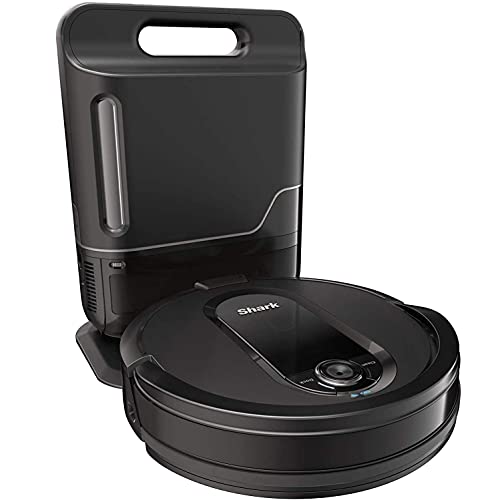
Shark IQ Robot Vacuum with Self-Empty Base
Best for: Pet owners seeking bagless self-emptying convenience
- Connectivity
- Wi-Fi (what this guide is about)
- Dock Capabilities
- Self-emptying base
- Self Empty Capacity
- Up to 45 days
- Special Features
- Self-Emptying, Mapping
- Control Method
- Alexa
- Dimensions
- 38.9 × 26.3 × 49.6 inches
View on Amazon: Shark IQ Robot Vacuum with Self-Empty Base Affiliate link
This robot vacuum uses Wi-Fi to connect with the SharkClean app and voice assistants like Alexa or Google Assistant. It features IQ Navigation for home mapping and row-by-row cleaning. The self-emptying base holds up to 45 days of debris, reducing maintenance. It includes a self-cleaning brushroll to handle pet hair. The recharge and resume function ensures complete coverage even in larger homes.
Pros
- Wi-Fi connectivity for app and voice control
- Self-emptying base with 45-day capacity
- Self-cleaning brushroll resists hair wrap
- Recharge and resume capability
Cons
- No 5GHz Wi-Fi support mentioned
- No sonic mopping function included
- No HEPA filter specification listed
Good fit if
- You want a bagless self-emptying base
- You need pet hair pickup with anti-wrap brush
- You prefer row-by-row cleaning patterns
Skip if
- You require a robot mop for floors
- You need 5GHz Wi-Fi connection
- You want a compact unit under 12 inches tall
Verdict: Shark IQ Robot Self-Empty XL is a strong choice for pet owners who want to minimize emptying tasks. It suits those who value self-cleaning brushes and reliable app scheduling over mopping features.
Specifications side by side
| Spec | Shark AI Robot Vacuum with Bagless HEPA Base | Shark Ultra Self-Emptying Robot Vacuum | Shark Matrix Plus Robot Vacuum & Sonic Mop | Shark Robot Vacuum with Self-Empty Base | Shark ION Wi-Fi Robot Vacuum | Shark IQ Robot Vacuum with Self-Empty Base |
|---|---|---|---|---|---|---|
| Cleaning Function | not stated | not stated | 2-in-1 vacuum and mop | not stated | not stated | not stated |
| Navigation Type | 360° LiDAR vision | 360° LiDAR vision | 360° LiDAR | 360 degrees LiDAR vision | not stated | not stated |
| Dock Capabilities | HEPA Bagless Self Empty Base | Bagless self-empty base | HEPA bagless self-empty base | Bagless self-emptying base | Charging dock | Self-emptying base |
| Self Empty Capacity | up to 30 days | Up to 30 days | 30 days | Up to 30 days | not stated | Up to 45 days |
| Mop Mechanism | not stated | not stated | Sonic mopping | not stated | not stated | not stated |
| Connectivity | Wifi | WiFi | not stated | WiFi | 2.4GHz Wi-Fi | not stated |
| Special Features | Self-Emptying, Mapping, HEPA Filter | Self-Emptying, Mapping, HEPA Filter | Mop, Self-Emptying, Mapping, HEPA Filter | Self-Emptying, Mapping | not stated | Self-Emptying, Mapping |
| Ideal For | Pet Hair | Pet Hair | Pet Hair | Pet Hair | not stated | not stated |
| Control Method | not stated | not stated | not stated | Alexa | Alexa | Alexa |
| Dimensions | 13.7 × 13.7 × 4.1 inches | 12 × 12 × 7 inches | 12 × 12 × 14 inches | 13.1 × 8.43 × 13.9 inches | 12.4 × 3.54 × 12.6 inches | 38.9 × 26.3 × 49.6 inches |
| Weight | 14.4 pounds | 11.1 pounds | 7.91 pounds | 14.4 pounds | 6.6 pounds | 5.87 pounds |
| Size | 30-day Dry | not stated | not stated | not stated | Works with Alexa | 45-Day Capacity |
| Color | Dark Grey | Black | Black/Bronze | Black/Silver | Gray | Black |
| Model | AV2501S | UR2360S | not stated | not stated | Shark Ion Robot | RV101AE |
Frequently asked questions
Do all robot vacuums need Wi-Fi to work?
No. While most modern units use Wi-Fi for app control and mapping, basic models operate without it. For example, the Shark ION Wi-Fi Robot Vacuum includes this feature, but you can also find units that rely solely on voice commands or manual start buttons. Wi-Fi enables remote scheduling and real-time status updates, which are not available on non-connected devices.
Can I control my robot vacuum with voice commands?
Yes, if the model supports it. Several Shark models, including the AV2501S and UR2500SR, list Alexa as a control method. This allows you to start or stop cleaning hands-free. The connection relies on your home Wi-Fi to relay these commands from your voice assistant to the robot, ensuring seamless integration with your smart home setup.
How does Wi-Fi help with mapping?
Wi-Fi uploads precise mapping data to the cloud, improving navigation over time. Models like the Shark UR2360S and UR2500SR use LiDAR mapping combined with this connectivity. This allows the robot to learn your home layout and avoid obstacles more effectively. You can view these maps and set no-go zones directly through your smartphone app.
Is Wi-Fi required for self-emptying bases?
Not strictly, but it is common. Most self-emptying models in this list, such as the Shark AI Robot Vacuum with Bagless HEPA Base, use Wi-Fi to notify you when the bin is full or to schedule emptying cycles. This connectivity ensures you know when maintenance is needed without checking the base manually, keeping your routine automated.
What happens if my Wi-Fi goes down?
The robot typically continues cleaning but loses remote control. You cannot start, stop, or schedule jobs via the app or voice commands until the connection is restored. Mapping updates may pause. However, the device will usually resume its last known task or complete the current cycle once Wi-Fi is back online, ensuring your floor still gets cleaned.
Do I need a specific router for these robots?
You need a standard 2.4 GHz Wi-Fi network for most models. The Shark Matrix Plus and other listed units require this connection to sync with your app. Ensure your router is within range of the robot’s charging dock. Strong signal strength helps maintain reliable communication for features like precise mapping and real-time status updates.